Your plugin folder
is a mess.
PlugPane fixes it.
A purpose-built manager for VST3, AU, CLAP and AAX. Scan, tag, version and load every plugin you own. Works across every DAW, on every machine.
Name your own price — recommended donation $4.99
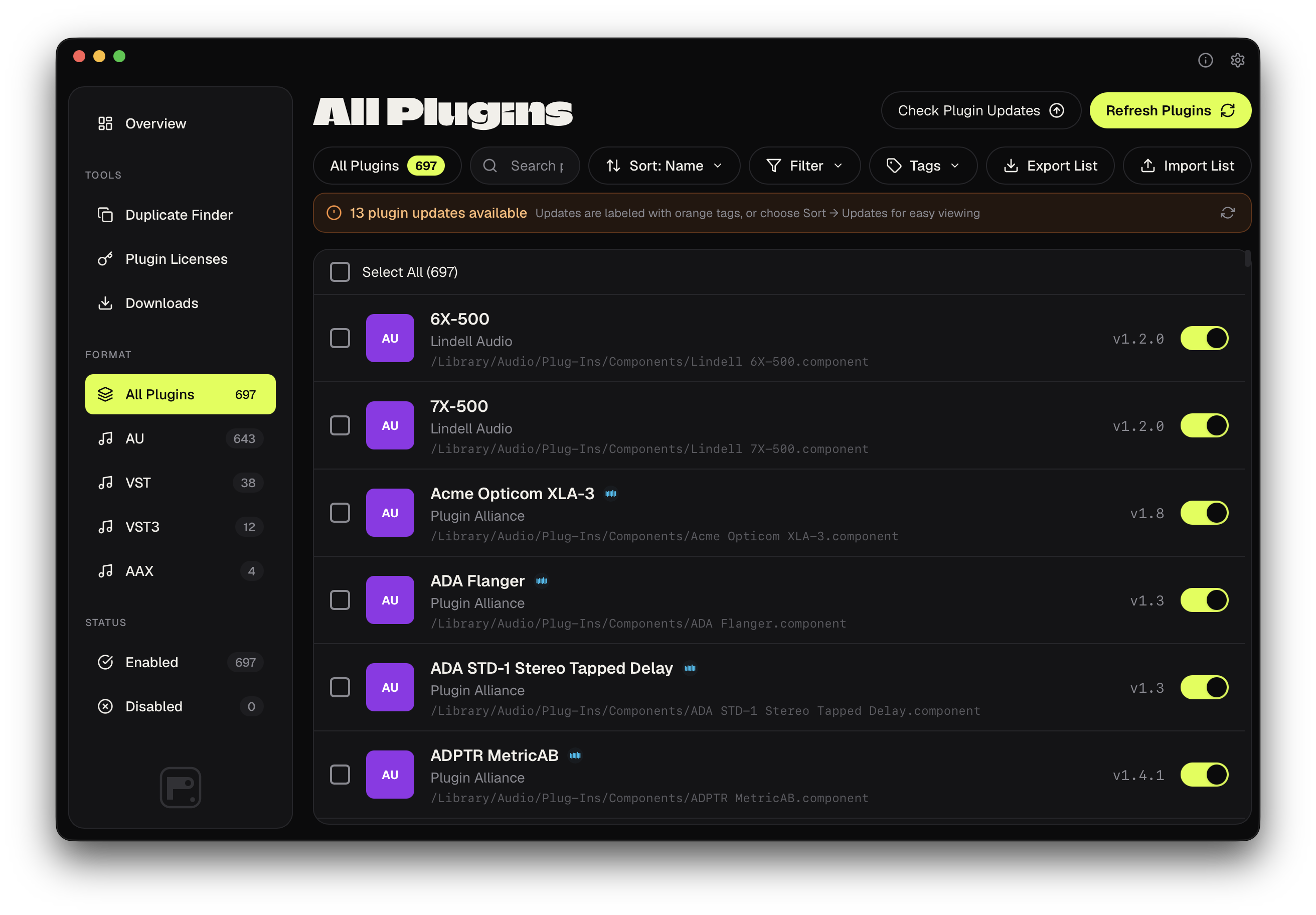
Built for the chaos
of real sessions.
Six things every audio engineer wishes their DAW already did.
Universal scanner
One pass indexes VST3, AU, CLAP and AAX from every install path on your system. Catches sandboxed Audio Units that other tools miss.
Smart Tagging
Auto-classifies every plugin by category, character and use case. Override anything you disagree with — your library, your rules.
License vault
Keep track of all your plugin licenses with iLok integration and manual serial number storage. Never lose a license again.
Duplicate detection
Find duplicate plugins across your system. Save disk space and clean up redundant installations that can cause conflicts.
Database matching
Automatically matches your plugins against our 50K+ database to get pricing, descriptions, and shop URLs.
Enable/Disable
Quickly enable or disable plugins with a simple click. Perfect for troubleshooting DAW issues or organizing your workflow.
From flagged to
installed. Automatically.
Spotting an outdated plugin is only half the job. PlugPane downloads the update, shows real-time progress, and installs it — running the vendor's installer or swapping the plugin file in place, whichever the update needs. Your previous version always moves to the Bin first, so nothing is ever deleted outright.
- ✓One-Click Download: Pulls the installer directly — no browser tab, no hunting through Downloads
- ✓Live Progress: Watch it download right in the plugin's detail panel, cancel anytime
- ✓Automatic Install: Runs the vendor's .pkg installer, or finds and swaps the file inside a .dmg or .zip
- ✓Safety Net: The old version always moves to the Bin first, restorable if anything goes wrong
- ✓Overview at a Glance: Every pending update across your whole library, surfaced right on the Overview tab
Color-coded tags
for instant recall.
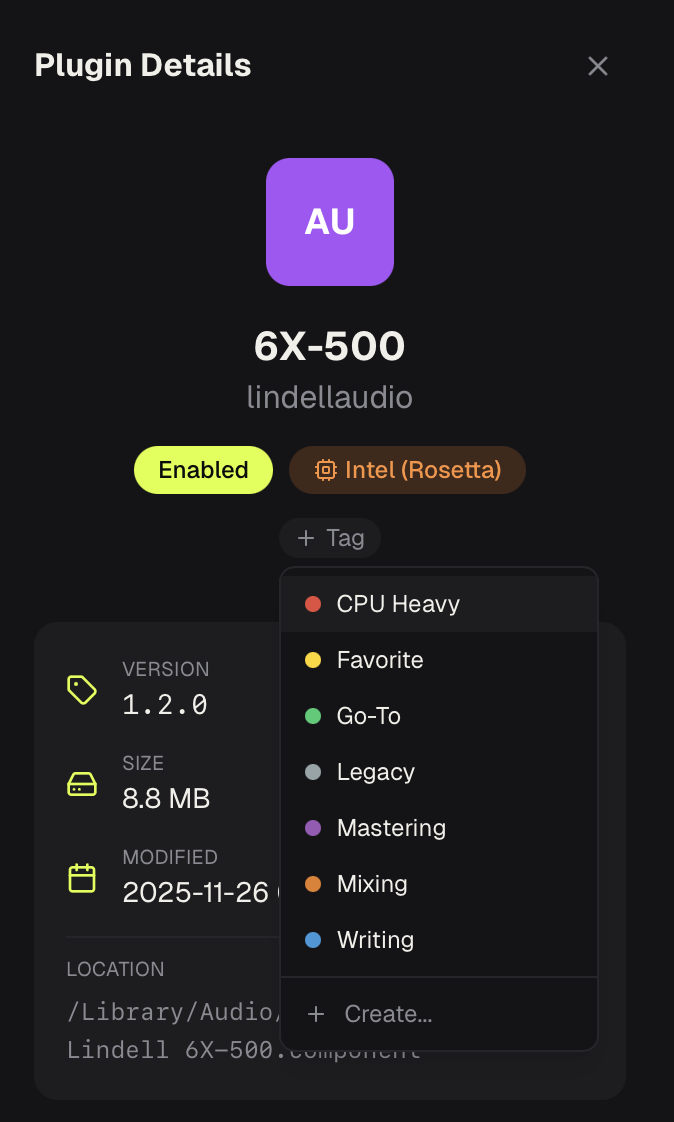
Tag plugins by workflow stage (Mixing, Mastering, Writing) or by character like CPU Heavy, Legacy, or Go-To. Create custom tags that match how you actually think about your tools.
- CPU Heavy: Flag resource-intensive plugins
- Favorite: Your desert island plugins
- Go-To: The ones you reach for first
- Custom: Create unlimited tags
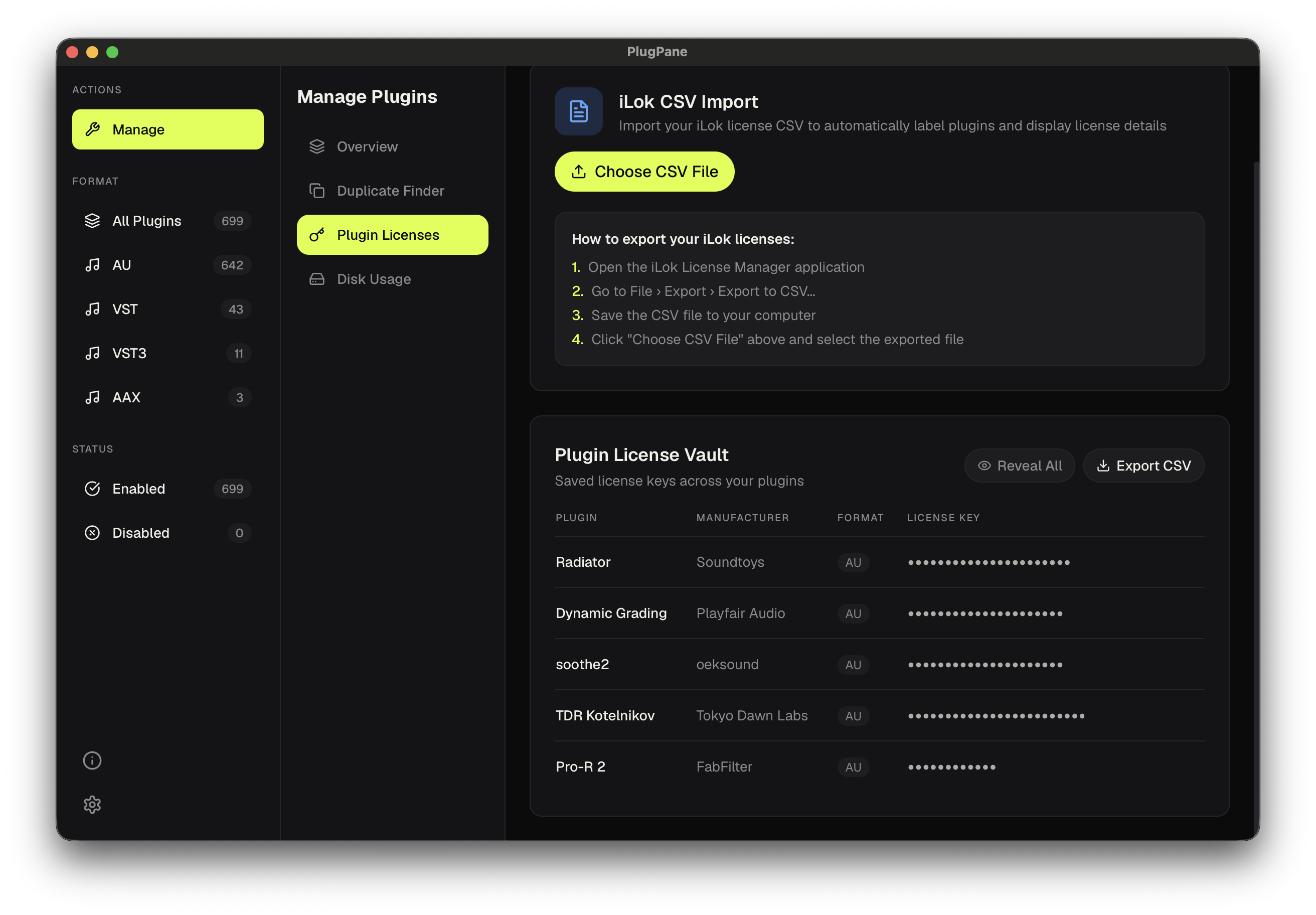
Every serial.
One secure vault.
Stop hunting through old emails every time you reinstall. PlugPane keeps every license key you own in one place — hidden behind a reveal toggle, exportable as a CSV backup, and never uploaded anywhere.
- ✓iLok Integration: Auto-import directly from your iLok CSV export
- ✓Serial Key Storage: Save any license key next to the plugin it belongs to
- ✓Show / Hide Keys: Keys are masked by default — reveal individually or all at once
- ✓Export to CSV: Back up your entire vault with one click, saved locally to your Downloads folder
- ✓Stays on Your Machine: Zero cloud sync, zero accounts — your licenses are yours
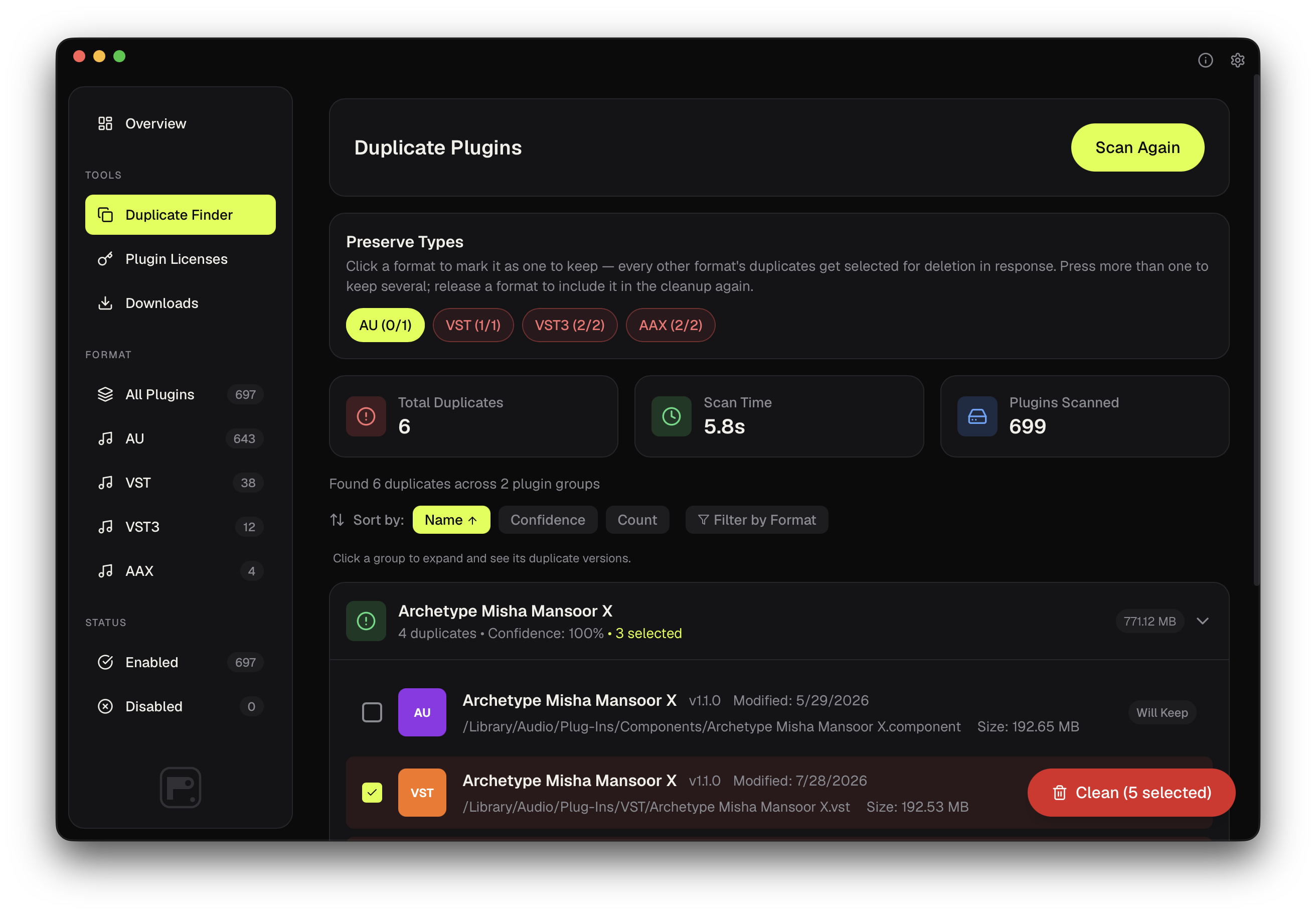
Find duplicates.
Reclaim disk space.
Over time, plugin folders accumulate redundant copies: old versions, multiple formats, forgotten installs. The Duplicate Finder scans your entire system and shows you exactly what can be safely removed — nothing is ever selected for deletion until you say so.
- ✓Opt-In by Default: Every row starts unchecked — you choose exactly what gets cleaned
- ✓Preserve Types: Click a format to keep it — every other duplicate format is selected for you
- ✓Confidence Scoring: See how certain each match is
- ✓Moves to Bin, Never Deleted: Removed plugins are always recoverable
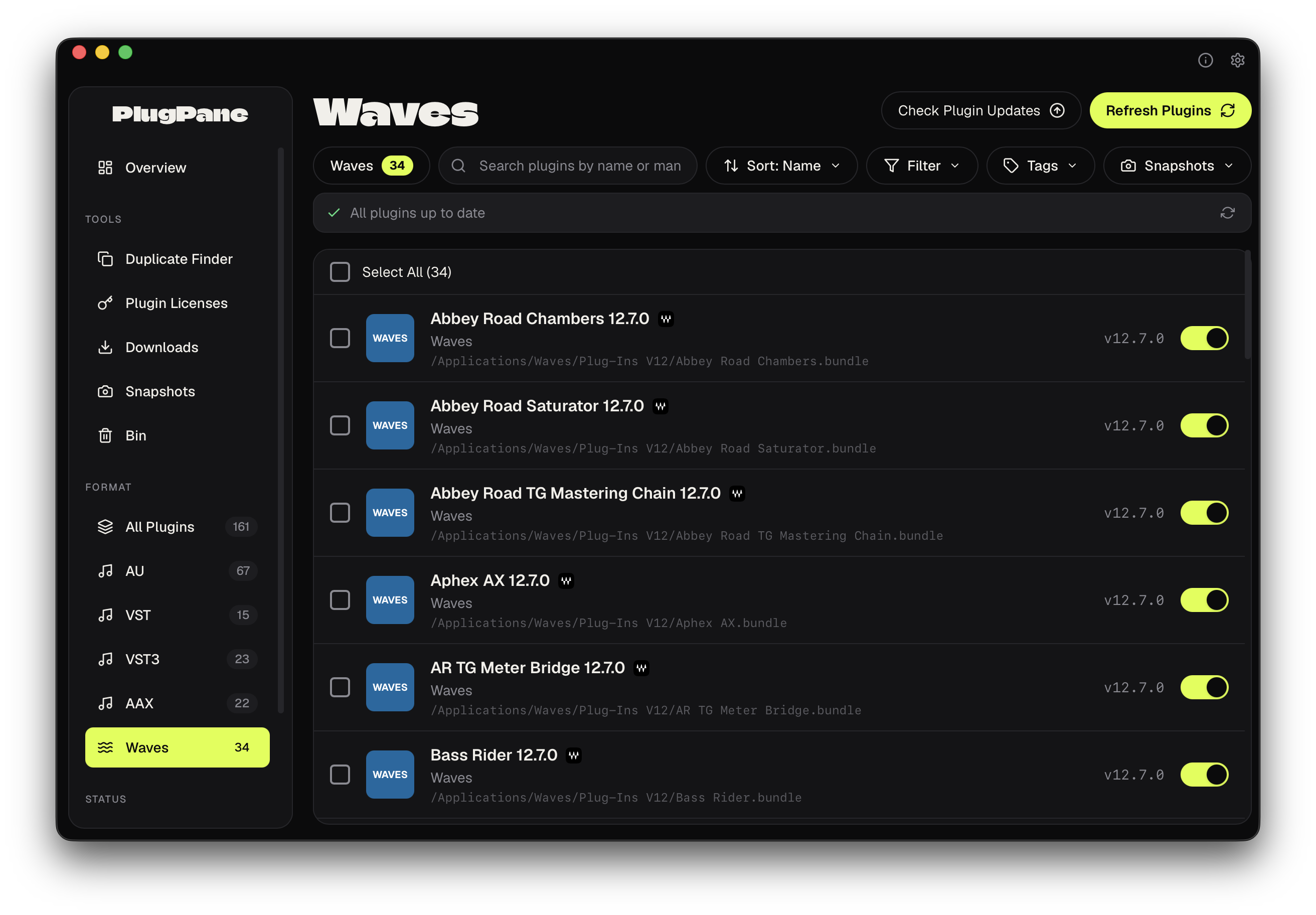
Every Waves plugin,
listed on its own.
Waves ships everything behind a single WaveShell, so most tools show you one opaque entry instead of the plugins you actually installed. PlugPane auto-detects your /Applications/Waves/Plug-Ins V* folders and breaks that shell apart — every Waves plugin appears as its own row with name, version, size and architecture, right alongside the rest of your library.
- ✓One Row Per Plugin: Each installed Waves plugin listed individually — not a single WaveShell blob
- ✓Manage Them Like Any Other: Enable, disable, delete-to-Bin and reveal individual Waves plugins
- ✓WaveShells Labeled Correctly: Shell entries carry a badge and show how many plugins they host, with a warning before you disable a whole format at once
- ✓Dedicated Waves Filter: Its own sidebar bucket with a live count, plus a settings switch to exclude Waves from scans
A portable record
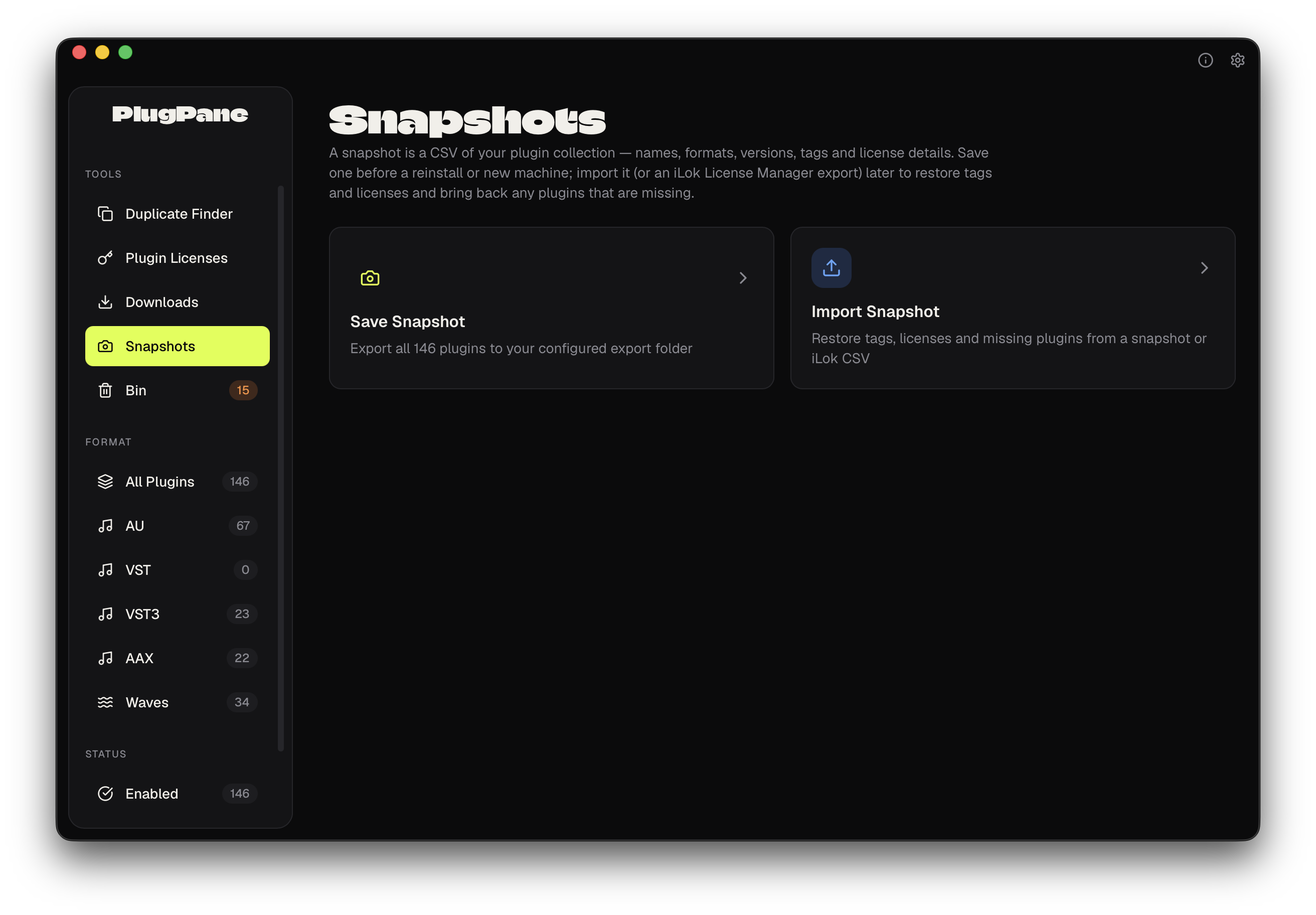
of your whole rig.
A snapshot is a CSV of your entire plugin collection — names, formats, versions, tags and license details. Save one before a reinstall or a move to a new machine, then import it later (or import an iLok License Manager export) to bring your tags and licenses back and re-download missing plugins.
Reinstalling plugins from a snapshot rides on PlugPane's update engine, so it isn't 100% — it can only fetch the plugins that engine knows how to pull. It won't rebuild your whole library in one click, but it will reinstall a meaningful portion of it straight from the CSV, and it always restores your tags and license info.
- ✓Save Everything to CSV: Names, formats, versions, tags and license details in one portable file
- ✓Restore Tags & Licenses: Import a snapshot or an iLok CSV to bring your organization back on a fresh install
- ✓Reinstall a Portion Automatically: Pulls back the plugins the update engine can fetch — a head start, not a full clone
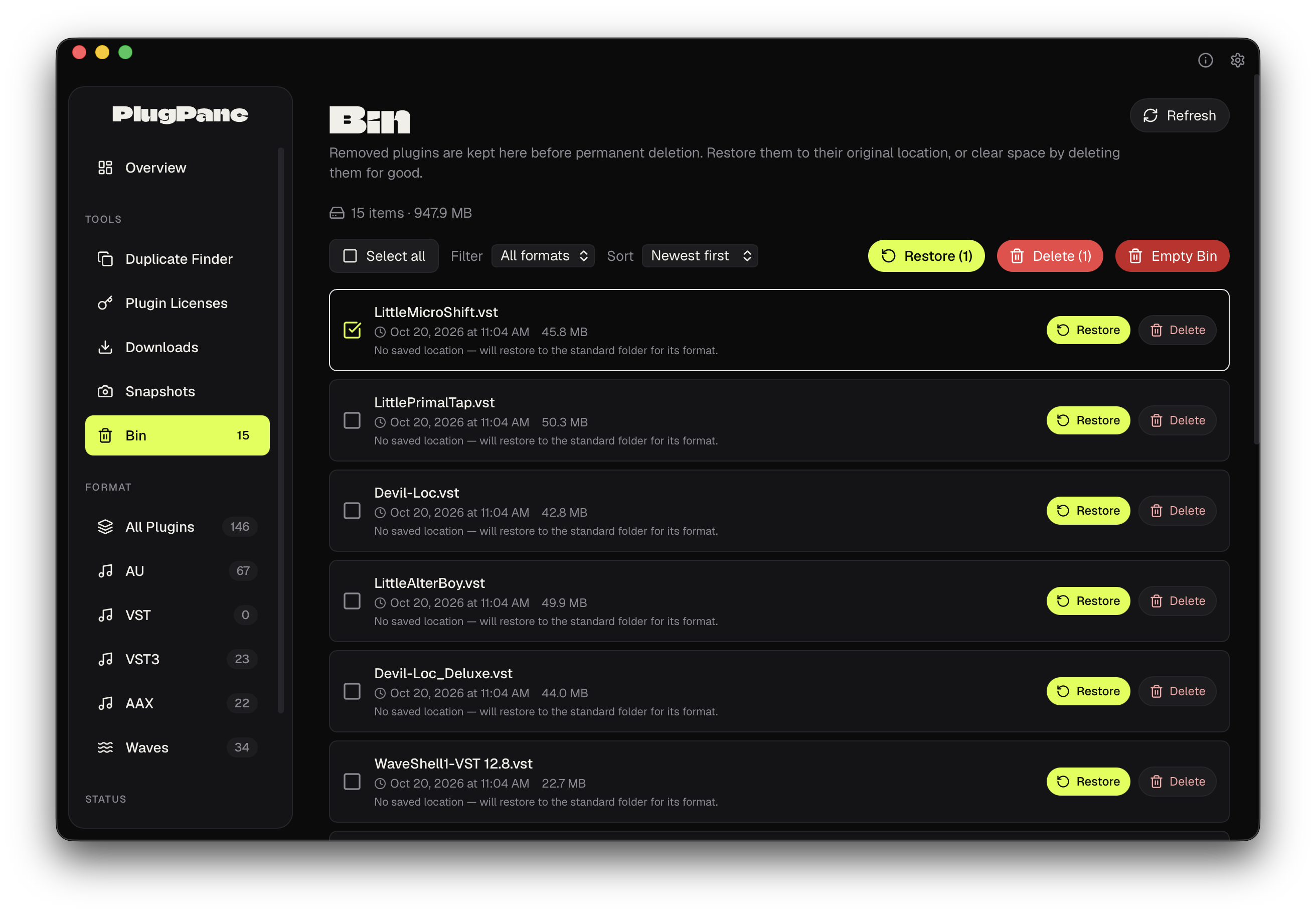
Nothing is deleted
outright.
When PlugPane removes a plugin — a cleanup, an update, a duplicate sweep — it moves the old bundle to the Bin instead of erasing it. Restore it to its original location, or clear the space for good once you're sure. Every item shows its size and when it was removed, with select-all, bulk restore and bulk delete.
A heads-up: the Bin is still in beta and actively being worked on, because macOS file-permission rules make restoring some plugins to their exact original spot tricky. So many of you emailed asking for hands-on control over removed plugins that we pushed this out early to meet the need — expect it to keep getting better.
- ✓Restore to Original Location: Puts a plugin back where it came from, with a sensible fallback when the exact path isn't recoverable
- ✓Delete Permanently: Clear individual items or empty the whole Bin to reclaim disk space
- ✓Bulk Actions: Select all, restore or delete in batches, filter and sort by size, type, name or date
Tame the
plugin folder.
This is beta software, and by downloading, installing, using it, and sharing your feedback, you're directly helping shape its development into something great.
If you encounter bugs or unexpected behavior, don't get discouraged — instead, let me know! Every setup is different, from hardware and operating systems to permissions, installed software, and countless other variables. Your experience is unique, and that makes your feedback incredibly valuable.
As a solo developer, I can't possibly test every configuration or anticipate every edge case. That's where you come in. Your feedback helps me identify issues, prioritize improvements, and steer the product in the right direction.
Thanks for being part of the process. I genuinely appreciate it!
Got questions?